

Reply by text
Text back the 4-character reply code followed by your message. For example: B3K9 Sounds good, thanks!
If you skip the code, your reply goes to the most recent email in your thread.
Help center
Everything you need to know about receiving email as text, replying, and managing your account.
Getting started
When you sign up with your phone number, you get an email address based on that number — for example, 5558675309@txtmail.co. Share this address anywhere you'd normally give out an email.
When someone sends a message to your txtmail address, you'll get a text instead of an email. No app to install, no inbox to check.
Receiving email
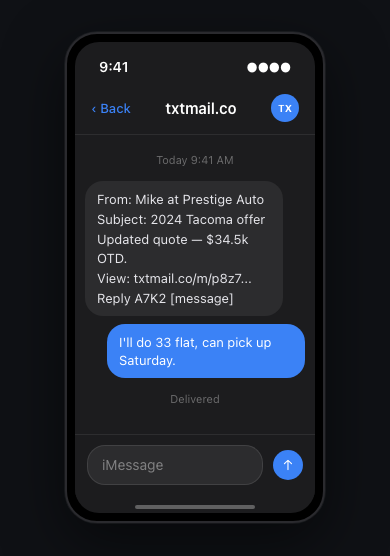
Each inbound email is summarized and sent as a text message. The text includes the sender's name, the subject, a short preview of the message, and two things:
Reading your email
Tap the link in the text to open the full email in your browser. You'll see the complete message, any attachments, and the full conversation history if there are multiple replies.
Each link is private — it only works for one conversation and doesn't require logging in.
Replying
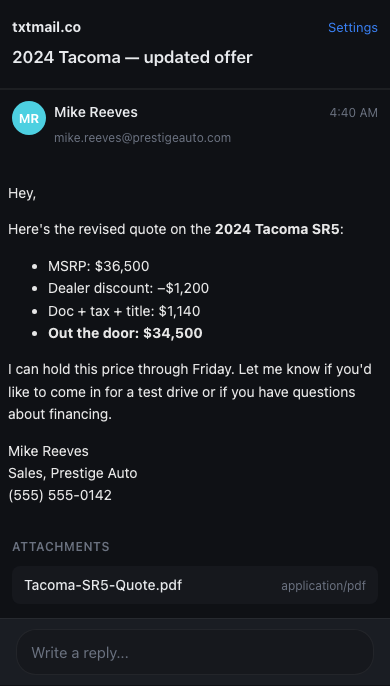
Text back the 4-character reply code followed by your message. For example: B3K9 Sounds good, thanks!
If you skip the code, your reply goes to the most recent email in your thread.
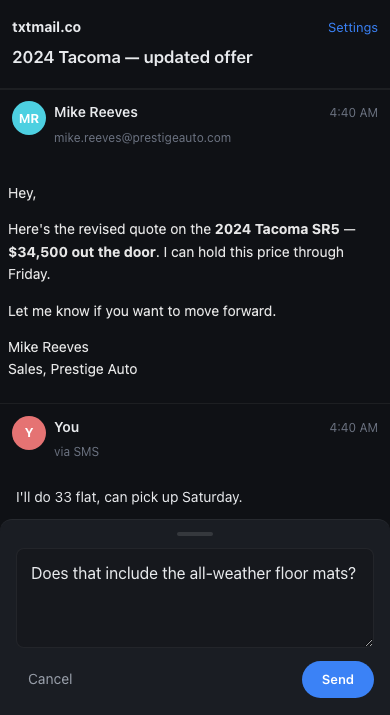
Open the thread link and tap "Write a reply" at the bottom. Type your message and hit Send. The sender receives a normal email reply.
Replies do not count against your monthly email limit — only inbound emails use credits.
Plans & limits
Each inbound email that gets forwarded as a text uses one credit. Replies (both SMS and web) are free and unlimited.
| Plan | Price | Emails / month |
|---|---|---|
| Free | $0 | 20 |
| Starter | $9/mo | 100 |
| Pro | $29/mo | 500 |
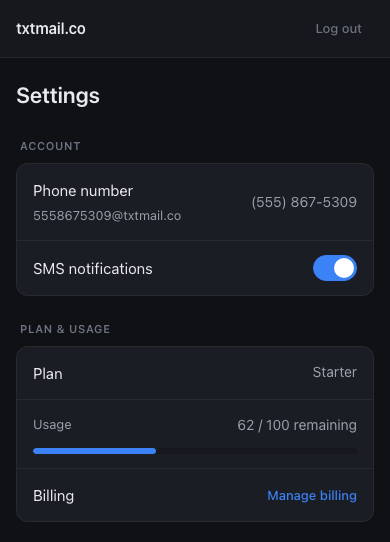
New emails stop being forwarded as texts until your credits reset at the start of the next billing cycle (or you upgrade to a higher plan). You'll receive a one-time text letting you know you've reached the limit. Emails sent while you're over the limit are not stored.
Attachments & images
File attachments (PDFs, documents, etc.) appear in the thread view below the email body. You can download them directly from the thread.
For your privacy, remote images in emails are blocked by default. If an email contains images, you'll see a "Show images" button at the top of the message. Tap it to load them. This prevents email tracking pixels from firing automatically.
SMS controls
You can control SMS notifications at any time by texting these keywords to the txtmail.co number:
| Text | What it does |
|---|---|
STOP | Opt out of all text messages from txtmail |
START | Opt back in to text messages |
HELP | Get support info and a link to this page |
You can also toggle SMS notifications on or off from the Settings page without affecting your account or credits.
Settings
Pro features
The Pro plan ($29/mo, 500 emails/month) includes two additional features:
sarah-m@txtmail.co that forwards to your phone number. You can create and remove aliases from Settings.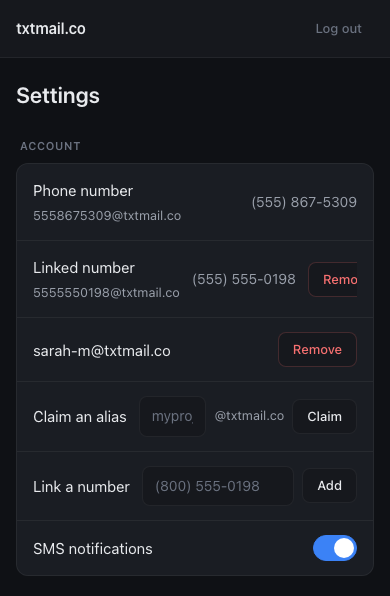
FAQ
The email is summarized and sent to your phone as a text message. The text includes the sender, subject, a preview, a private link to the full thread, and a reply code.
No. txtmail works entirely through SMS and your web browser. There is no app to download.
No. Only inbound emails use credits. You can reply as many times as you want by SMS or from the web — replies are always free.
Your reply is sent to the most recent email in your thread. The reply code is only needed if you want to reply to a specific older email.
Replies come from your txtmail address (e.g. 5558675309@txtmail.co), so the sender sees a normal email. They won't know it was sent via text unless you tell them.
They are not forwarded or stored. You'll receive a one-time text letting you know you've hit the limit. Once your credits reset at the start of the next billing cycle (or you upgrade), new emails will start forwarding again.
Remote images are blocked by default to protect your privacy. Many emails include tracking pixels that notify the sender when you open a message. Tap "Show images" to load them when you're ready.
Text STOP to the txtmail number, or turn off SMS notifications in Settings. Your account stays active either way — you can turn texts back on anytime with START or from Settings.
Your primary address is based on your phone number and can't be changed. On the Pro plan, you can create custom aliases (like myname@txtmail.co) that forward to your number.
txtmail doesn't have a web inbox or message archive. Each email thread has its own private link that's included in the text you receive. Thread links expire after 30 days.
Reach out to support@txtmail.co and we'll get back to you.